PWA · Save to home screen

Equ used as an app

You don’t need to download from the App Store or Google Play. Add Equ used to your home screen and open the shop with one tap — the same premium experience as on the web.

A web app (PWA) is often smarter than a store app: you always get the latest version straight away, without waiting for updates in the App Store or Play Store.

Why save to the home screen?

  • Quick access

    Equ used sits among your apps — no searching in the browser.

  • Clean full-screen view

    The address bar can be hidden so you get more focus on the products.

  • The same Equ used design

    Identical content to equused.se — we are building towards a full PWA experience.

  • Always up to date

    When we improve the shop you benefit straight away — no app-store updates to download.

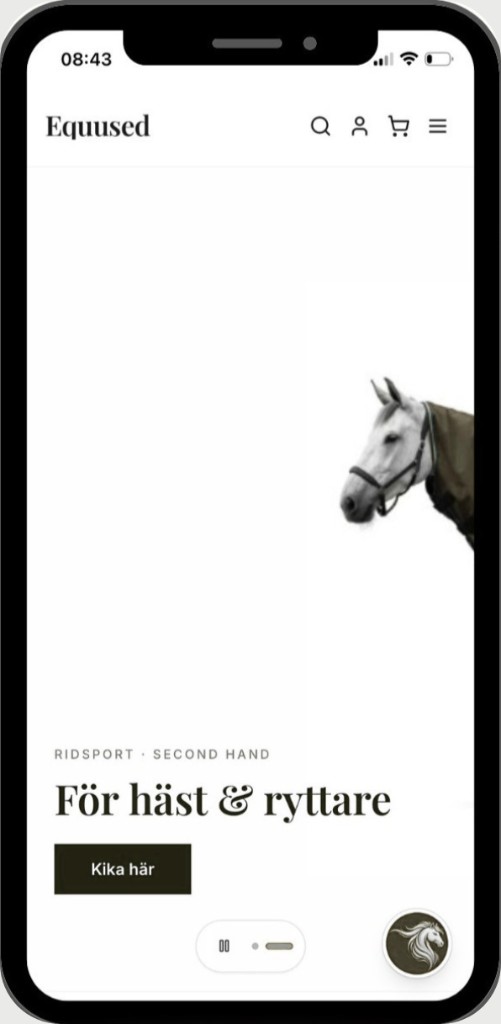
The Equ used app shown on an iPhone

Coming soon: we will activate the full PWA functionality (manifest, offline support where it fits) as we launch. Already now it works excellently to add the page to the home screen according to the guide below.

How to do it

Choose your system. The steps may differ slightly between phone models — look for "Add to Home Screen" or "Install".

iPhone & iPad

Safari

  1. 1

    Open in Safari

    Go to equused.se in the Safari browser (not Chrome or the built-in Instagram browser).

  2. 2

    Tap the share button

    At the bottom of the screen: the icon with an arrow up out of a square (Share).

  3. 3

    Add to Home Screen

    Scroll down in the menu and choose Add to Home Screen. Confirm the name Equ used — done!

Tip: On some iOS versions the option is called "Add to Home Screen" in English.

Android

Chrome

  1. 1

    Open in Chrome

    Visit equused.se in Google Chrome.

  2. 2

    Open the menu

    Tap the three dots at the top right (More).

  3. 3

    Add to home screen

    Choose Add to Home screen or Install app — depending on phone and Chrome version.

Samsung Internet and other browsers have similar menu options — look for install or shortcut.

Computer (Chrome or Edge)

In the address bar on the right you may see an install icon, or open the menu ⋮ and choose "Install Equ used…" when the browser offers it.

Ready to find a bargain?

To all products